Compute the ICA
Open the recording, then choose ICA > Compute ICA.
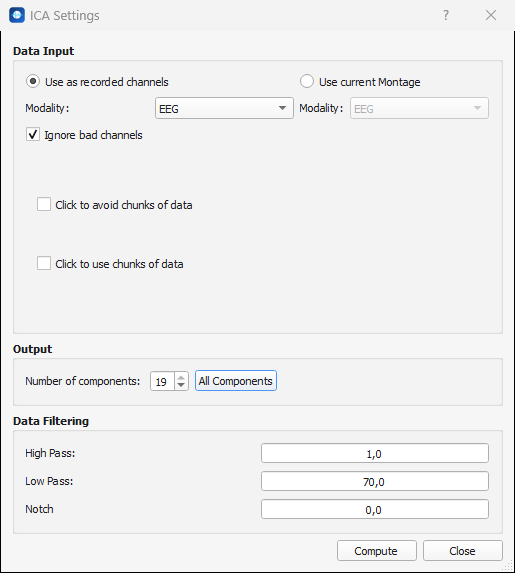
Set the options below and click Compute. Close leaves without computing anything.
Channels
| Option | Effect |
|---|---|
| Use as recorded channels (default) | The ICA is computed on the channels of the file, whatever the current montage is. |
| Use current Montage | The ICA is computed on the channels of the montage you are using: a re-referenced or bipolar montage, for instance. |
| Modality | The type of the channels to use: EEG, MEG, SEEG, EMG... Only the types that exist in the file are listed. One type is processed at a time: to analyze EEG and MEG of the same recording, compute two ICA. |
| Ignore bad channels | The channels flagged as bad are left out. It is on by default: a flat or noisy channel would spoil every component. |
Data to use or to avoid
These two options only show when the recording has markers.
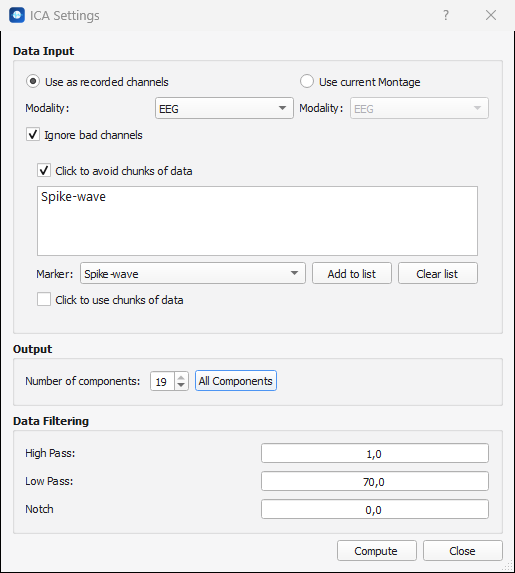
- Click to avoid chunks of data: the data covered by the markers of the list are left out of the computation. Choose a marker label in Marker, click Add to list, and repeat for each label. Clear list empties it. Use it for the artefacts that happen once and that no component can describe: an electrode that pops, a movement, a long burst of muscle activity.
- Click to use chunks of data: the computation is done only on the data covered by the markers of the list.
Both lists work the same way: every marker that has the label you chose and that covers a time range counts. Without any list, the ICA uses the whole recording.
Tip
Do not avoid what you want the ICA to find. Eye blinks or a heartbeat that happen all along the recording are exactly what a component should describe: leave them in the data, and reject their component afterwards.
Number of components
Number of components is the number of components to extract. AnyWave proposes 50, or the number of channels when there are fewer. All Components sets the maximum, which is the number of channels used.
| Rule | Message |
|---|---|
| At least two components | Not enough components to compute. |
| No more components than channels | The number of components is greater than the number of available channels. |
Fewer components than channels is a usual choice when the recording is short or when many channels are very similar (a high density EEG). AnyWave then first reduces the data to their main directions (a principal component analysis) and looks for the components among them.
Filters
The data are filtered before the computation: High Pass, Low Pass and Notch, in Hz. The window remembers the values of your last computation.
- A high pass of 1 Hz is a good start: slow drifts are large compared with the brain activity and disturb the components.
- Use the low pass and the notch to leave out what you do not want to see in the components (muscle activity above 70 Hz, the 50 or 60 Hz line noise).
- With a low pass and a high pass of 0 Hz, AnyWave asks you to confirm that you want to compute the ICA on unfiltered data.
The filters are part of the result: AnyWave applies the same filters to the signals of that type when it loads the components, see ICA files.
While it computes and after
The computation runs as a process of AnyWave. When it is over, AnyWave loads the components by itself, as if you had used Load ICA components: they appear in a new view and in the ICA Components window.
AnyWave writes a log of the computation: the data that were used, the filters, each iteration of the algorithm and the name of the result. It also warns when the recording is short for the number of components you asked.
The components are sorted by decreasing variance: the first components are the ones that carry the largest part of the signals, and the large artefacts such as the blinks are usually among them.
The result
The result is written in the folder of the data file, or in the derivatives folder of the
BIDS database when the recording belongs to one. It is made of two files with the same
name.
recording_algo-infomax_mod-EEG_hp-1_lp-70_notch-0_comp-19_ica.mat
recording_algo-infomax_mod-EEG_hp-1_lp-70_notch-0_comp-19_ica.json
| Part of the name | Meaning |
|---|---|
recording |
The name of the data file, without its extension. |
algo-infomax |
The algorithm. |
mod-EEG |
The type of the channels. |
hp-1, lp-70, notch-0 |
The filters used for the computation, in Hz. |
comp-19 |
The number of components. |
- The
.matfile holds the matrices of the ICA, see ICA files. - The
.jsonfile is a summary of the computation, easy to read: the algorithm, the type and the names of the channels, the number of components, the sampling rate, the filters, the markers that were used or skipped, and the date.
Computing again with the same parameters writes the same file names: the previous result is replaced. Change one of the parameters (the number of components, a filter) to keep both.
To compute the ICA on many recordings, use the command line.