Montages in a BIDS database
When a recording is opened from a BIDS database, the montage works as everywhere
else, with two additions: your montage and your bad channels are stored in the database, and the bad
channels and the channel types are kept in line with the file channels.tsv of the recording.
Where your montage is kept
For a recording sub-003_task-rest_run-01_eeg.vhdr, AnyWave writes, in your own folder of the database:
derivatives/anywave/<your user name>/sub-003/eeg/
├── sub-003_task-rest_run-01_eeg.vhdr.mtg     your montage
├── sub-003_task-rest_run-01_eeg.vhdr.bad     your bad channels
├── sub-003_task-rest_run-01_eeg.vhdr.mrk     your markers
├── sub-003_task-rest_run-01_eeg.vhdr.flt     your filters
└── sub-003_task-rest_run-01_eeg.vhdr.display your display settings (gains...)
Each user of the database has a separate folder: your montage never overwrites a colleague's. To share a montage, the bad channels or the markers, use Push ... to common and Pull ... from common (context menu of the recording in the BIDS panel, see Sharing markers, montages and bad channels).
Bad channels and channels.tsv
channels.tsv, in the folder of the recording, belongs to the dataset: everyone who opens the recording reads it.
It lists the bad channels in its status column (good / bad). AnyWave keeps it in line with your choices, and
never changes it behind your back.
- When you flag a channel as bad (in the editor, or from the signal view),
channels.tsvis updated withbad. The first time, the original is kept in your derivatives folder aschannels.tsv.bak. - When you mark as good a channel that
channels.tsvlists as bad, AnyWave asks before touching the dataset:
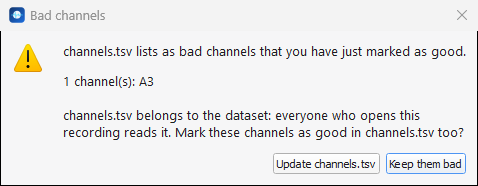
Update channels.tsv marks the channel as good in the file too. Keep them bad (the default, also
Escape) leaves channels.tsv as it is.
- When you open a recording for the first time, the bad channels of
channels.tsvbecome your own list. If you already have a list and it differs fromchannels.tsv, AnyWave shows both differences (Only in channels.tsv, Only in the .bad file) and asks which bad channels to apply: Merge both (the default: every channel flagged on either side is kept), Keep the .bad file, or Use channels.tsv.channels.tsvfollows your choice when you close the recording.
Channel types and channels.tsv
The type column of channels.tsv says what each channel is (EEG, SEEG, ECG...). It is applied when you open
the recording, which is how a recording imported with SEEG contacts opens with SEEG channels.
- When you change the type of a channel in the editor, the new type
is written to
channels.tsv(the original is kept aschannels.tsv.bak).
name   type   units   ...
Pz     ECG    microV  ...
- When your montage and
channels.tsvdisagree at opening (a colleague changed the file, or you edited it by hand), AnyWave asks which one wins:
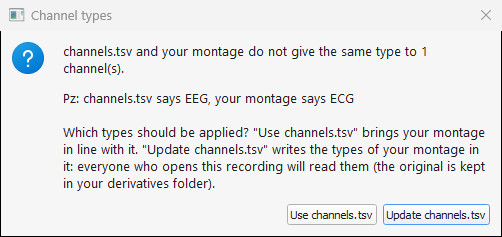
Use channels.tsv brings your montage in line with the dataset. Update channels.tsv writes the types of your montage in the dataset: everyone who opens the recording reads them from then on. Escape and closing the box always mean Use channels.tsv: nothing is written in the dataset without an explicit choice.
Note
When channels.tsv says EEG for every channel (what most recording formats give), it teaches nothing to your
montage: the types you set by hand are your work. In that case the default button of the box (Enter) is
Update channels.tsv. As soon as channels.tsv gives a channel a type of its own that your montage
contradicts, the default button is Use channels.tsv.