- Requirements
- anywave package
- Use the Plugin Creation Assistant
- What is a Plugin?
- desc.txt
- __main__.py
- DEBUG Python plugin
- Python API package
A Python plugin is a folder located in the user home dir.\ Documents\AnyWave\Plugins\Python on Windows.\ /home/username/AnyWave/Plugins/Python on Linux.\ /users/username/AnyWave/Plugins/Python on macOS.
Requirements
A python local installation or a virtual environment located in the AnyWave/Plugins/Python/venv folder.\ The Plugins/Python/venv folder is created the first time AnyWave is launched.\ A good practice is to create it using the classic python -m venv command\ Place the venv in the folder mentioned earlier and AnyWave will detect it when starting.
anywave package
The virtual environment must have the anywave-plugin-api package.
pip install anywave-plugin-api
Use the Plugin Creation Assistant
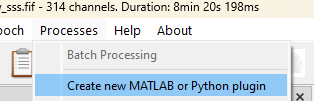
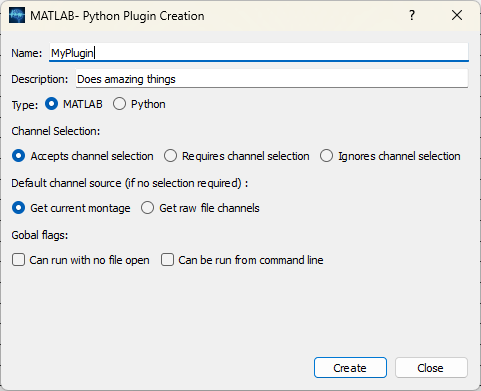
Change MATLAB option to Python!
What is a Plugin?
It's a folder placed on Plugins/Python subfolders of AnyWave.\ When AnyWave starts the first time it creates a folder named AnyWave in the user's home directory.\ In the AnyWave folder you will find a Plugins\MATLAB folder.\ Create a directory for you plugin in that location or use the Plugin Creation Assistant (see previous section).
desc.txt
A file called desct.txt must be put in your Plugin.\ This file is a simple text file that must contain the following lines:\ name = My Plugin\ description = Do something on data\ When using the Plugin Creation Assistant, the file is created for you.
optional lines
To tune up the behavior of your plugin you may add some flags to tell AnyWave what you plugin can do:\ flags=nodatarequired -> this line will inform anywave that your plugin can run even if no data file is open.\ flags=canrunfromcommandline -> this flag indicates that your plugin can be run from the command line.\ You can combine flags by separating them with a colon (:)\ flags=nodatarequired:canrunfromcommandline
Put your plugin in a submenu, by adding the following line:\ category=Process:MyCategory:My plugin\ This line will create a sub menu called MyCategory in the Processes Menu of AnyWave and a link to launch the plugin.
__main__.py
A filed called __main__.py must also be put in your Plugin.\ This file along with desc.txt file will make your folder an AnyWave Python plugin.\ When using the Plugin Creation Assistant, the file is created for you.\ The file must look like:
import sys
import anywave as aw

aw.init(sys.argv)
args = aw.get_props()
Command Line
You may want your plugin to be used when AnyWave is launched using the command line.
AnyWave can run processes/plugins when launched that way:
anywave --run MyPlugin --input_file <filepath> --plugin_option1 option --plugin_option2 option ...
Add a flag to desc.txt
Add or edit the following line in desc.txt:
flags = CanRunFromCommandLine
Handle command line options
By default the plugin will have all parameters passed to anywave in the resulting args variable after the call to:
import anywave as aw
import sys
aw.init(sys.argv)

args = aw.get_props();
print(args["plugin_option1"])   # value for plugin_option1 from the command line.
print(args["plugin_option2"])   # value for plugin_option2 from the command line.
However, this is possible only if we inform AnyWave about plugin_option1 and plugin_option2.
Otherwise, an error will occur when using the command line saying that plugin_option1 and plugin_option2 are unknown options.
Register specific options
To add support for specific command line option, add a file called args.json in the plugin folder.
This is a JSON file that must be like this:
{
     "Parameters" : ["plugin_option1", "plugin_option2"]
}
Setup your Python installation in the Preferences
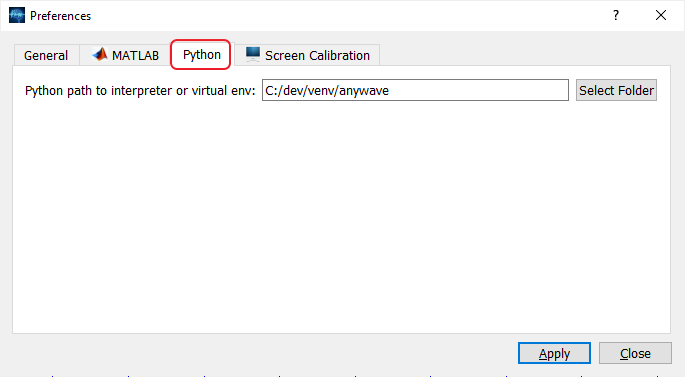
If you want to use a venv, just pick the folder of your venv, AnyWave will detect the Python interpreter.
Compiled plugin
There are several python tools to build an exe file from a python package, like pyexec. This is supported by AnyWave that will run the py.exe as if it was a regular python plugin. Inform AnyWave to run an exe by adding the following line in desc.txt: compiled plugin=nameofexefile