Introduction
Markers are items marking events or time selections in traces.\ They have a position in time in seconds, a duration (which can be zero), a label, a numerical value.\ Two more information can be optionally added : the colour and the targeted channels.\ \ A marker with no targeted channels is called Global.
That means they mark a position or a time selection or an single event global to all traces.
Marker manager
AnyWave allows managing markers using a UI.\
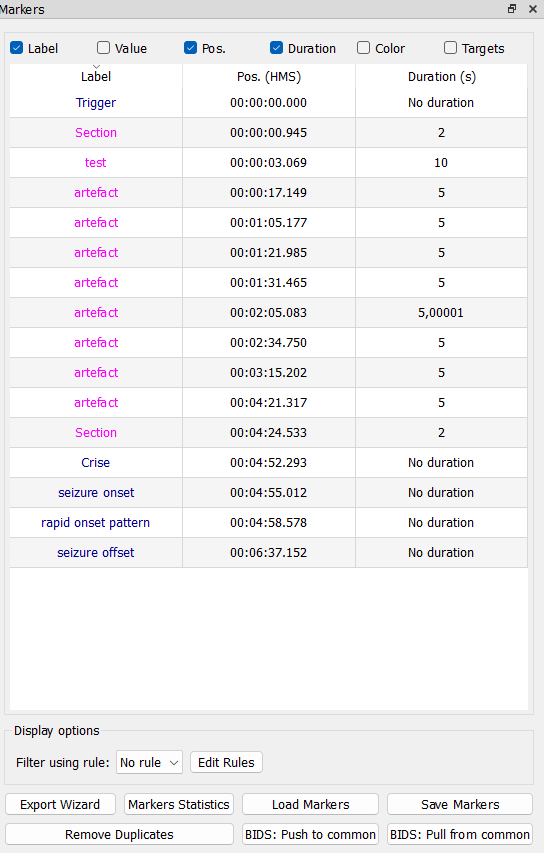
When loading a data file, if markers are detected within the file they will be inserted in the list of current markers and appear in the following window:\
Editing markers
Right click on a column (cell) in the table and choose Modify.\
Note:
You can apply the value or color of a marker to all markers or to all selected markers.
This allow rapid editing of colors and values.
Export, Remove, Rename
Right click on a marker or a selection of markers and choose the operation in the menu.
MRK file format
It is a text file with tab separated values (tsv file).\ Lines starting with // will be ignored.
There are 4 mandatory columns:
#1 label
#2 numerical value associated (-1 for no value)
#3 position in seconds in the file
#4 duration in seconds (0 for single markers)
Columns 5 and or 6 can be added to store respectively the colour and the targeted channels.
Colours values must be store using the following format: #RRGGBB \ Values for Red Green and Blue must be in hexadecimal.\ Example for red color : #FF0000
Targeted Channels must be a coma separated list of electrodes labels: A1,A2,Fp2
Examples
// #label       #value   #position    #duration    #colour/channels    #channels/colour
   stim1        -1         10.0          0
   HFO          150       51.23         0.2         #FF0000                  A1
   stim2         -1         16.2          0         #00FF00
   event         -1          8.2          15        Fp3
- stim1 is a global marker at 10s.
- HFO is a marker targeting channel A1. The value 150 could be the Frequency detected, and its color is RED.
- stim2 is another global marker with green colour.
- event happens on channel Fp3, the position is 8.2s and duration is 15
As you can see, column 5 and or 6 can contain the colour or the targeted channels.
AnyWave will detect what is what by testing the colour scheme starting with # character.