AnyWave databases (BIDS)
AnyWave can organise your recordings in a database: a regular
BIDS dataset (Brain Imaging Data Structure) that AnyWave
creates, fills and browses for you. Every subject has its own folder, every recording is converted to a
BIDS file name the first time you add it, and everything you do afterwards (markers, montages, filters,
processing results...) is kept next to the data, in a derivatives folder.
Because a database is nothing more than a BIDS dataset, you can also register a BIDS dataset that was made by another tool, and open an AnyWave database with any BIDS-aware software.
This section explains how to:
- create a database, register an existing one, and open it;
- add a subject;
- add EEG, iEEG (sEEG), MEG and anatomical (MRI/CT) data to a subject;
- browse the database and open a recording from the BIDS panel.
Quick start
- Edit > Preferences > AnyWave DB > Create Database... — choose a folder and a name.
- File > Open Database — the database opens in the BIDS panel on the right of the window.
- Database > Add Subject to Database... — give the subject a label (
001,002...). - Database > Add File(s) to Subject... — choose the subject, the modality, the file(s), and click Import.
- Double-click the recording in the BIDS panel to open it.
Where to find the commands
| Where | What for |
|---|---|
| Edit > Preferences > AnyWave DB | Create a database, register an existing one, unregister one. |
| File > Open Database | Open one of your registered databases. |
| File > Open BIDS | Open any BIDS folder, registered or not. |
| File > Recent BIDS directories | Re-open a database you used recently. |
| Database menu | Add subjects and data, plus a few tools that work on the whole database (see below). |
| BIDS panel (right-hand side) | Browse subjects and runs, open a recording, add subjects or files, delete data. |
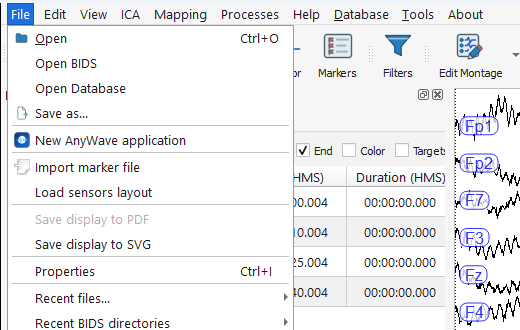
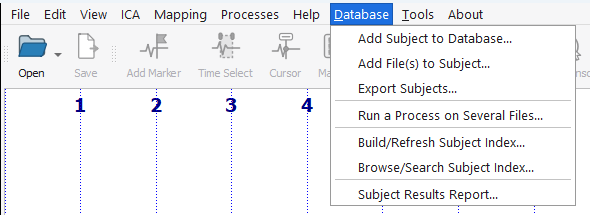
The Database menu also gives access to tools that work on a whole database. They are not described in this section:
| Entry | In short |
|---|---|
| Export Subjects... | Copies the runs of one or more subjects of the open database into another registered database. Existing files are never overwritten. |
| Run a Process on Several Files... | Runs a process (a plugin) on many recordings of a database in one go. |
| Build/Refresh Subject Index... | Builds or refreshes a local index of a database, used to search it quickly. |
| Browse/Search Subject Index... | Searches the index: which subjects have which data, filtered on the columns of participants.tsv. |
What a database looks like on disk
This is the database built in the following pages, with two subjects:
MyDatabase/
├── dataset_description.json
├── participants.tsv
├── .anywave/                          AnyWave's own settings for this database (see below)
├── sub-001/
│   ├── anat/
│   │   ├── sub-001_run-01_T1w.nii
│   │   └── sub-001_run-01_T1w.json
│   ├── eeg/
│   │   ├── sub-001_task-rest_run-01_eeg.vhdr          (+ .eeg and .vmrk)
│   │   ├── sub-001_task-rest_run-01_eeg.json
│   │   ├── sub-001_task-rest_run-01_channels.tsv
│   │   └── sub-001_task-rest_run-01_events.tsv
│   └── meg/
│       ├── sub-001_task-rest_run-01_meg.fif
│       ├── sub-001_task-rest_run-01_meg.json
│       ├── sub-001_task-rest_run-01_channels.tsv
│       ├── sub-001_task-rest_run-01_coordsystem.json
│       └── sub-001_task-rest_run-01_events.tsv
├── sub-002/
│   └── ses-implant/
│       └── ieeg/
│           ├── sub-002_ses-implant_task-seizure_run-01_ieeg.vhdr   (+ .eeg and .vmrk)
│           ├── sub-002_ses-implant_task-seizure_run-01_ieeg.json
│           ├── sub-002_ses-implant_task-seizure_run-01_channels.tsv
│           ├── sub-002_ses-implant_task-seizure_run-01_events.tsv
│           └── ... run-02 ...
└── derivatives/
    └── anywave/
        ├── <your user name>/         markers (.mrk), filters (.flt), display settings (.display)...
        ├── common/                   markers, montages and bad channels shared by all users
        └── subject_index_v1.sqlite   the search index
participants.tsvlists the subjects (see Add a subject).sub-<label>/[ses-<session>/]<modality>/holds the recordings. The modality folders areanat,eeg,ieegandmeg.derivatives/anywave/is where AnyWave keeps everything that is not raw data. Each AnyWave user of the database gets their own folder there; thecommonfolder is a copy that all users can share (see the BIDS panel). Results of the processes you run on a recording (ICA, spectral analysis...) are stored inderivativesas well..anywave/contains a random value, specific to the database, used to hash patient identities. When you copy a database to another place, copy this folder too.
Note
AnyWave keeps the list of your registered databases in its own user settings, not inside the dataset. On another computer, register the database again (see Create, register or open a database).